
Download AmmoBaseX – Secure Sports Software for macOS
Overview
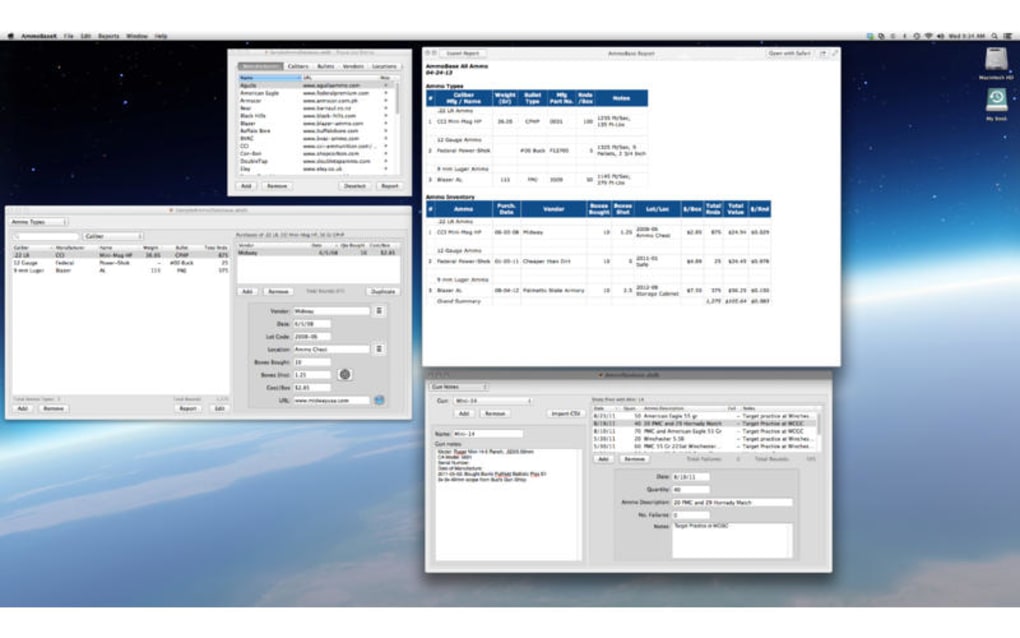
AmmoBaseX is a full‑version sports application designed exclusively for macOS. Developed by Matt Longmire, the program focuses on providing shooters, hunters, and competitive marksmen with a powerful database to track ammunition performance, load data, and competition scores. The user interface follows Apple’s design guidelines, delivering a clean, intuitive experience that feels native on a Mac.
AmmoBaseX supports both beginner and professional users, offering customizable fields, detailed statistical analysis, and export options for sharing data with coaches or fellow athletes. The app is available in English and is marketed as a one‑time purchase, eliminating the need for recurring subscriptions. Its emphasis on data security, regular updates, and seamless integration with macOS makes it a reliable tool for anyone serious about improving their shooting performance.
Key Features
- Comprehensive Ammunition Database: Store caliber, bullet weight, powder type, primer, and load data in a searchable format.
- Performance Tracking: Record muzzle velocity, group size, and accuracy statistics for each load.
- Competition Log: Log scores from IPSC, IDPA, 3‑Gun, and other shooting sports with event‑specific fields.
- Statistical Analysis: Generate charts and reports that highlight trends, outliers, and improvement areas.
- Export & Import: CSV and JSON export for easy sharing; import legacy data from other shooting apps.
- Secure Cloud Sync: Optional iCloud sync keeps your data safe and accessible across multiple Macs.
- Customizable Templates: Create personalized load sheets or competition forms to match your workflow.
- Automatic Updates: Receive free updates that add new features and keep the app compatible with the latest macOS releases.
- Dark Mode Support: Native dark mode ensures comfortable use in low‑light environments.
- Help Center & Community: Built‑in tutorials, FAQ, and a user forum for troubleshooting and tips.
Installation, Usage & Compatibility
Step‑by‑Step Installation
- Visit the official AmmoBaseX website and click the Download for macOS button.
- The DMG file will launch automatically; drag the AmmoBaseX icon into your Applications folder.
- Open the app from Applications. macOS may warn you about an unidentified developer; choose Open Anyway in System Preferences → Security & Privacy.
- Follow the on‑screen wizard to accept the license agreement and create your first user profile.
- Activate iCloud sync (optional) by signing in with your Apple ID under Settings → iCloud.
First‑Run Usage Tips
When you launch AmmoBaseX for the first time, a welcome tour guides you through the main dashboard. Start by creating a new ammunition entry: select “Add Load,” fill in the caliber, bullet, powder, and primer details, then click “Save.” The app instantly calculates estimated velocity and suggests optimal charge ranges based on industry data. Use the “Performance Log” tab to record each shot’s results—simply input the measured velocity, group size, and any notes. Over time, the “Analytics” section visualizes your data, helping you spot which loads deliver the best consistency.
System Requirements
AmmoBaseX requires macOS 12 Monterey or later. The application runs efficiently on both Intel‑based Macs and Apple Silicon (M1, M2) thanks to universal binary support. Minimum hardware specifications include 4 GB RAM and 200 MB of free disk space for the core program; additional storage is needed for your personal data files. The app is optimized for Retina displays and supports both Light and Dark modes.
Updating the Software
Updates are delivered through the built‑in updater. When a new version is available, a notification appears in the menu bar. Click “Check for Updates,” download the latest package, and the installer will replace the existing version while preserving your data. All updates are signed and delivered over a secure HTTPS connection, ensuring the integrity of the download.
Pros, Cons & Frequently Asked Questions
Pros
- Deeply specialized for shooting sports with extensive data fields.
- Native macOS experience—fast, responsive, and visually consistent.
- Robust statistical tools that turn raw numbers into actionable insights.
- Secure iCloud sync keeps data safe without extra third‑party services.
- One‑time purchase model eliminates subscription fatigue.
Cons
- Limited to macOS; no Windows, Android, or iOS version available yet.
- Initial learning curve for users unfamiliar with detailed load‑tracking.
- No built‑in ballistic calculator; users must rely on external tools for advanced calculations.
FAQ
Can I use AmmoBaseX on a Windows PC?
Currently AmmoBaseX is a macOS‑only application. The developer has expressed interest in a Windows version, but no release date has been announced.
Is there a free trial available?
Yes, a 14‑day free trial can be downloaded from the official website. The trial includes all premium features, after which you’ll need to purchase a license to continue using the software.
How does iCloud sync handle conflicts if I edit the same load on two Macs?
iCloud uses last‑write‑wins logic. When a conflict is detected, the app prompts you to choose which version to keep or to merge changes manually.
Can I export my data to Excel?
Absolutely. AmmoBaseX provides a CSV export option that can be opened directly in Excel, Numbers, or any spreadsheet application.
Is my data encrypted during cloud sync?
Yes, all data transferred to iCloud is encrypted with Apple’s end‑to‑end encryption protocol, ensuring that only you can access your information.
AmmoBaseX delivers a specialized, feature‑rich environment for shooters on macOS. Its comprehensive data fields and powerful analytics set it apart from generic note‑taking apps. While the lack of a Windows version limits its audience, the seamless macOS integration, secure iCloud sync, and one‑time purchase model make it an excellent investment for dedicated marksmen.
Conclusion & Call to Action
AmmoBaseX fills a niche that many general‑purpose databases overlook: the need for a dedicated, secure, and analytically strong tool for ammunition and competition tracking on macOS. Its well‑thought‑out feature set, native performance, and commitment to data privacy make it a compelling choice for anyone looking to gain a competitive edge on the range. If you’re ready to organize your loads, visualize performance trends, and keep your shooting data safely synced across devices, click the download button below and start your free trial today.







